
There are several aspects of google chrome extensions available for making the browser commercial ,but some of them are probably the most needful marketing features of all.
Google Chrome extensions generally cost less than the traditional desktop apps,use less space and can be updated more easily and frequently.
The browser is helpful in improving your SEO strategy, such as tracking performance ,viewing metrics of your progress and racking up rankings.
Although more than 100000 extensions are available ,but it is difficult to decide the most needful.
So these are 6 SEO Chrome extensions you can’t live without
1.Keywords Everywhere for faster keyword research.
Keywords Everywhere is a free tool for researching keyword ,that helps you achieve the rankings more quickly and save your valuable time.
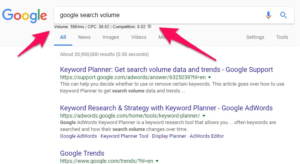
With the help of this extension, the cost per click for any given keyword over a million of websites can be checked and Google keyword search volume can be viewed.
Also ,it helps you save your precious time in complicating task such as searching and copying data from different sites.
With this extension, You can also download your metrics as a PDF or Excel document for easy and simple sharing or record keeping.
If you know your target keywords, it will be much easy to get a move on your competitors.
2.MozBar to find out how popular your competitors truly are.
MozBar is a significant extension for all things SEO.
You can run a quick SEO site overview of any page. Once you are logged in with a Moz community account (which is free), MozBar starts analyzing websites and SERPs.
It just looks at on-site content, social media engagement, technical SEO, and backlinks for any page you want.
These metrics are helpful in finding out the popularity of any website.
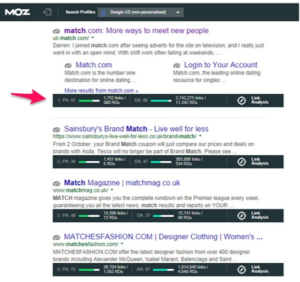
The higher the domain authority and page authority, the more popular any given site will be. MozBar effectively collects and displays this data quickly and efficiently.
3.SimilarWeb for general site analysis.
This tool uses different sources into account during site analysis, so that you can get more than basic SEO information.
You can achieve deep intutions into traffic, site time, bounce rates, and more.
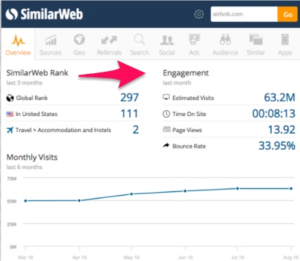
The tool performs this task by analyzing the clickstream data from a lot of Internet service providers, client data, and Similar Web site crawlers.
With the help of this tool, you can detect a company’s target audience demographics, the amount of money they spend on paid content, and the locations that their web traffic is coming from.
4.Majestic Backlink Analyzer to find out the quality (and quantity) of backlinks.
Building high-quality backlinks is much difficult, but it can be performed very easily with the help of this extension.
Majestic’s Backlink Analyzer helps you find out the total quantity and quality of backlinks that point to any given page.
It also shows you topical relevance to the source content, a Backlink history chart, and more.
Once you know which backlinks your competitors have, you can try and get those same sites to link back to you, too.
5.Google PageSpeed Chrome Extension to analyze site speed.
Google PageSpeed Chrome Extension is excellent to analyze page speed, which can lower your rankings if speeds are too slow. When the pages take longer time to load ,it becomes very difficult for the people to wait for such a longer period of time.
Google PageSpeed helps you take a look at just how fast your website is loading with a single click.
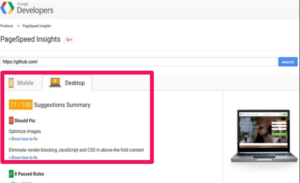
It’s simple and speedy to use, so that you can check up on your page speeds without expending massive part of your day.
6.Character Count to show how many characters are on site pages.
Character Count shows you that how many characters you have spotlighted on any web page.
It is essential Because there are cutoff lengths for title tags, meta descriptions, and more.
For example, Google will only display the first 50 to 60 characters of your title tags and 150 to 160 characters of your meta descriptions.
Only you have to do is click this extension to activate it, highlight some text, and the total number of characters will show up in the upper right corner of your browser.